● EAs running 24/7 while your PC is off

Your MetaTrader 5, always on, in any browser.

Log in with your broker account once. Your terminal runs in our cloud with your Expert Advisors trading around the clock, and you open it from a laptop, tablet or phone whenever you like.

1 account free for 72 hours · no card needed
$10 per account per month · any MT5 broker · pay with PayPal or crypto
Meta Cloud · web terminal
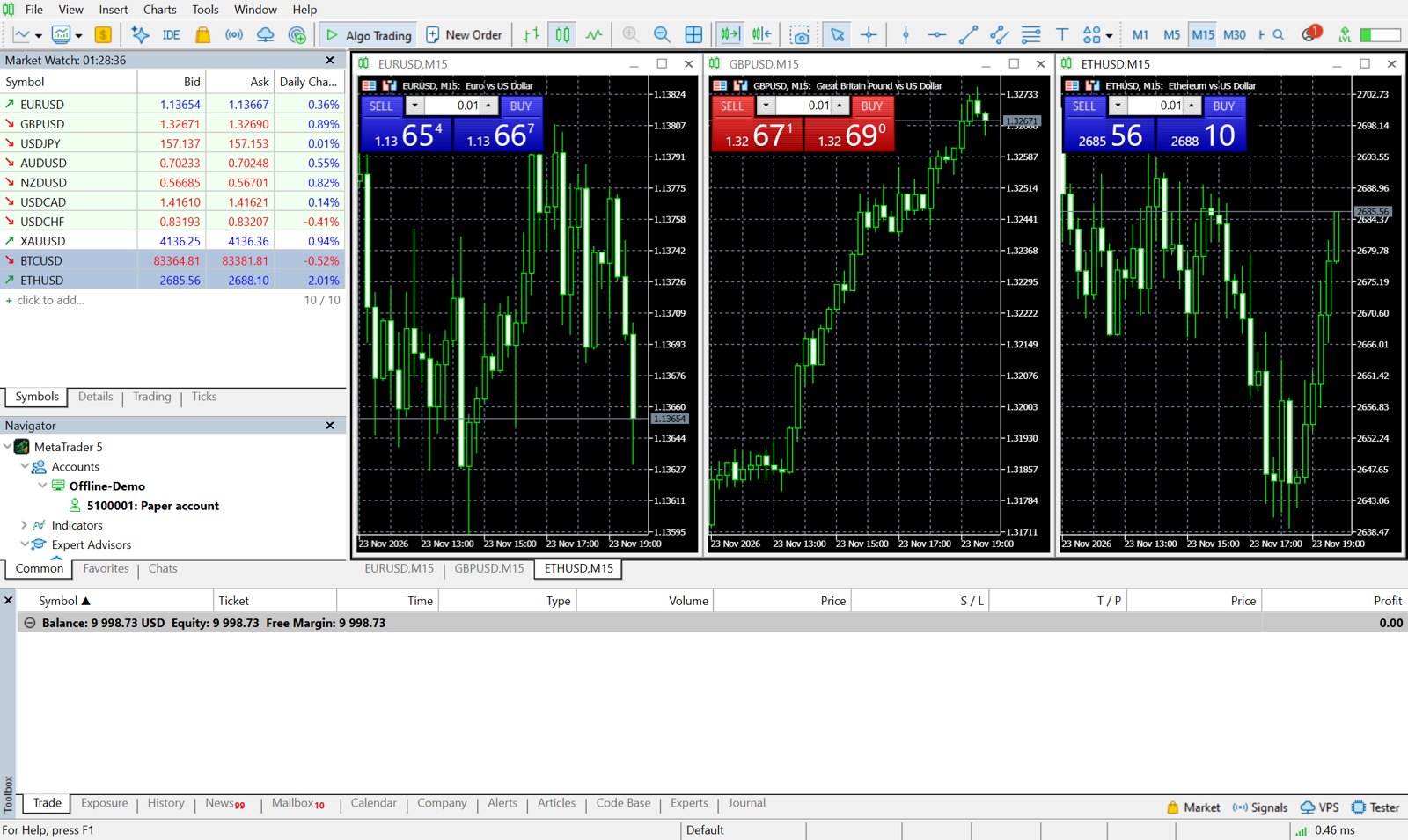
The MT5 web terminal: Market Watch, three live charts, Navigator and the Trade tab
How it works

Three steps. No VPS to set up.

No remote desktop, no Windows licence, no keeping a PC switched on overnight.

01

Choose how many accounts

Each MT5 account is $10 a month. Pay with PayPal or crypto, and add more accounts any time.

02

Log in with your broker

Type your MT5 login, password and server, exactly as in the desktop app. Any broker that offers MT5 works.

03

Attach your EA, close the tab

Upload your .ex5, pick symbol and timeframe, set its inputs. It keeps trading after you log off, and survives restarts.

Features

The MT5 you know, without the computer.

24/7 Expert Advisors

Up to 10 EAs per account, each on its own chart with its own inputs. They come back on their own after any restart.

Real MT5 in the browser

Market Watch, charts with indicators and drawing tools, one-click trading, Depth of Market, history and journal.

Any broker

Enter your broker's server name, just as you would on the desktop. Demo and live accounts both work.

Copy trading

Mirror one master account to as many of your other accounts as you like: lot multiplier, fixed lot, reverse, lot cap.

Private by design

Each account runs in its own isolated space. Your broker password goes straight into your terminal, and we never store it in readable form.

Phone, tablet, PC

Open the same terminal from any device. Your charts and settings follow you, and nothing needs installing.

Copy trading

One strategy, many accounts.

Choose a master account and any number of followers, even at different brokers. New trades, closes and SL/TP changes are copied within about a second.

  • Lot multiplier (0.5×, 2×…) or a fixed lot per follower
  • Reverse copying for hedging setups
  • Maximum lot cap per follower
  • Symbol names matched across brokers (EURUSD ↔ EURUSD.pro)
  • Trades already open on the master are never copied by surprise
Master · 2.00 lots Broker A · EA running
→
Follower 1 · 1.00 lot 0.5×Broker A
Follower 2 · 4.00 lots 2×Broker B
Follower 3 · 0.10 lot fixedBroker C
Free tools

Free Copier EA for your own MT5

Copy trades between MT5 terminals on the same computer or VPS. No sign-up, no limits, free forever.

What it does

  • One EA, two roles: Master sends, Slave copies
  • Lot multiplier or fixed lot, with a maximum lot
  • Reverse copying (buy becomes sell)
  • Copies SL/TP changes and closes within a second
  • Symbol prefix/suffix for brokers like EURUSD.pro
  • Channels: run several masters side by side

Set it up in 2 minutes

  1. In each MT5: File → Open Data Folder → MQL5 → Experts, put the file there, then refresh the Navigator.
  2. On the master terminal, drag the EA onto any chart. Leave Role = Master.
  3. On each follower terminal, drag it onto a chart and set Role = Slave, the lot rule and the symbol suffix if needed.
  4. Use the same Channel name on a master and its slaves. Turn on Algo Trading in every terminal.

All terminals must run on the same computer, and it must stay on. To copy between computers, or without keeping a PC on, use cloud copy trading in Meta Cloud: try it free for 3 days.

Pricing

One price. Per account.

Every feature is included: EAs, copy trading, all devices. Add or remove accounts whenever you like.

$10 / account / month
3
Total: $30 / month
Start free trial
First 72 hours free for 1 account. No card. Pay only if you keep it.
PayPalUSDTBTCETH+ more coins
FAQ

Questions

Does my EA really keep running when I close the browser?

Yes. The browser only shows the terminal; MT5 itself runs on our servers. Close the tab, shut down your PC, and your EAs keep trading. After a server restart your terminal logs back in and reattaches every EA on its own.

Which brokers work?

Any broker that offers MetaTrader 5. Type the server name shown in your broker's welcome email or in your desktop MT5, for example "YourBroker-Demo" or "YourBroker-Live".

Can I use my own EA?

Yes. Upload the compiled .ex5 file, choose the chart and set its inputs, all from the browser. We never need your source code.

Is my password safe?

Your broker password is sent once, over an encrypted connection, to your own isolated terminal. MT5 keeps it in its encrypted store so it can reconnect after a restart, and our website keeps no readable copy. You can also use your broker's investor (read-only) password to watch an account without trading.

How does copy trading handle different lot sizes and brokers?

Each follower has its own rule: a multiplier of the master's lot, or a fixed lot, plus an optional cap. Lots are rounded to what the follower's broker allows, and symbols are matched by name even when the broker adds a suffix.

What happens if I stop paying?

Your accounts keep running for 3 days after the plan ends. After that they are paused, not deleted, and renewing starts them again with all your EAs and settings.

How does the free trial work?

Sign up with your email and you can host one MT5 account for 72 hours with every feature, no card needed. One trial per person and per MT5 account. When it ends the account is paused, not deleted; choose a plan and it starts again with your EAs and settings.

MT4?

MT5 is available today. MT4 is on the way.